Open source.
Free and GPL-licensed. The code, permissions and known limitations are open for you to inspect.
 galley.
Clearer reviews for GitHub & GitLab
Help your team see what changed and how it fits together. Galley makes documents and code easier to read, shows edits in context, and keeps review comments beside the text they discuss.
Free & open source No account Chrome, Edge, Brave, Arc
Installation guideRFC 0042 · Changes in context
Each client may send 10 100 requests a minute to support larger batch uploads.
src/limits.ts
12export const limit = {
13− perMinute: 10,
13+ perMinute: 100,
Does this cover batch uploads?
Lee Yes. I’ll add an example to make that clearer.
docs/rfcs/0042-limits.md
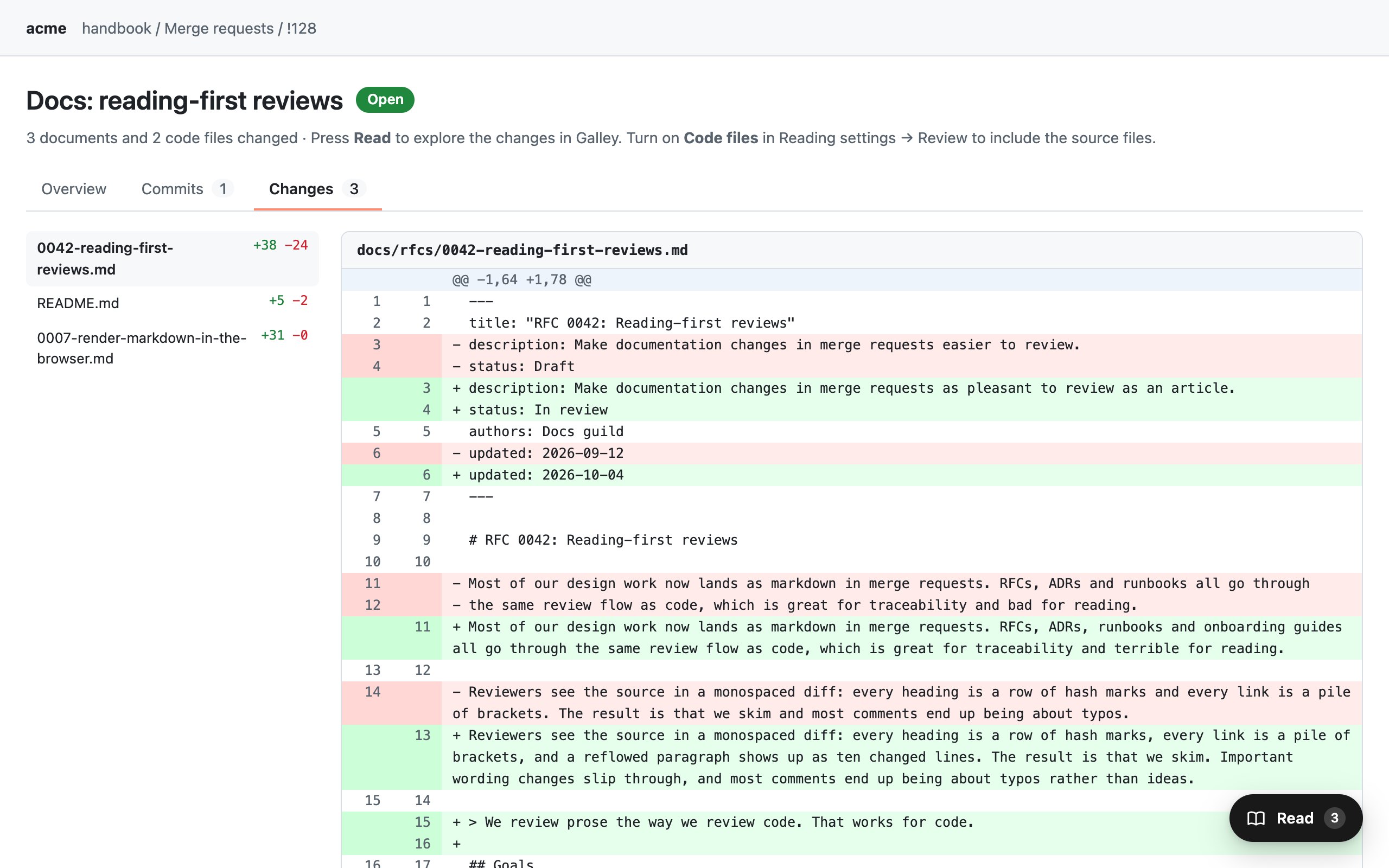
@@ -11,6 +11,7 @@ -## Limits +## Rate limits, revisited -Each client may send **10** requests a -minute to support larger batch uploads. +Each client may send **100** requests a +minute to support larger batch uploads.src/limits.ts
@@ -12,3 +12,3 @@ export const limit = { - perMinute: 10, + perMinute: 100,docs/review-modes.md
@@ -3,5 +3,5 @@ | Mode | Shows | - |---------|----------------------| + | ------- | -------------------- | - - [ ] Render tables + - [x] Render tables The same document and code changes, shown as a diff.Sample review. Switch views to compare.
Try the live demoWorks where your
team already reviews.
Why Galley exists
A useful review starts with understanding the change.
A pull request can span a proposal, a README and several source files. To review it well, your team needs to follow the explanation, inspect the edits and connect the discussion to the right text.
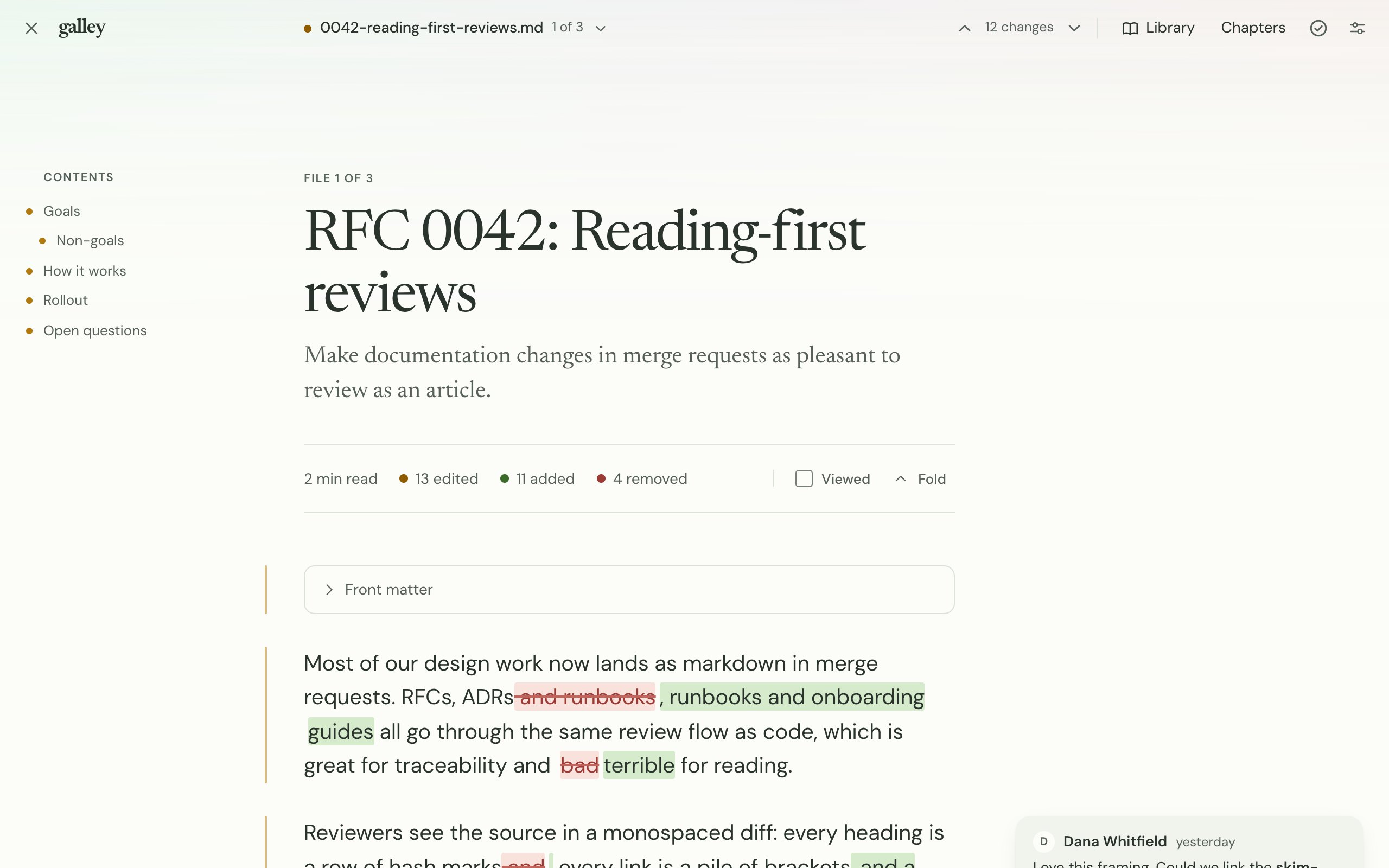
Galley brings those parts into one readable view. Documents keep their headings and tables. Code keeps its line numbers. Changes stay beside the context that helps you understand them.
More context for every reviewer. Ask a question beside the change, reply in the same thread, and keep the discussion on GitHub or GitLab.
Press Read on your GitHub pull request or GitLab merge request.
Follow the document as an article. Turn on Code files to include source changes.
See changed words in their sentences and changed code with line numbers. Expand unchanged sections when you need more context.
Add comments and replies beside the relevant text. Your team sees them in the original review.
Mark files as viewed as you go, then return to GitHub or GitLab to submit your review.
The same changes, easier to follow
Drag the divider to compare the demo’s diff view with the Galley reader. The files and comments are the same; Galley makes the text, edits and discussion easier to follow together.
How Galley helps
Read the proposal, inspect the code and discuss the details in one view. These features help your team understand what changed before deciding what to do next.
Read documents with headings, tables, task lists and diagrams. Include code files with syntax colours, line numbers and long lines that wrap to fit the screen.
Follow the explanation and the implementation.
Added words are highlighted and removed words struck through inside their sentences. Table edits appear in their cells, and changed link destinations are called out.
Understand the detail and the surrounding idea.
Re-wrapping a paragraph doesn’t mark it as a text change. Unchanged sections fold away; open them whenever you need the context.
Your scrollbar gets a breather.
Read threads beside the paragraph or code line they discuss. Select text to add a comment, reply in the thread, and keep your draft while you read on.
Teammates can reply on GitHub or GitLab.
Choose from nineteen palettes, six typefaces, five text sizes and six layouts. Use light or dark mode, compact spacing and keyboard shortcuts.
Adjust the view to suit your screen and your eyes.
Files render in your browser and comments go to the original review. Galley has no server, account or analytics. External images load only when you choose.
Works with your team’s existing review process.
See it in action
Explore real screenshots from the Galley demo: edits, comments, code, tables and diagrams. Open the live demo to try the reader yourself.
At a glance
Built for your team
Give reviewers a clear view of the work so they can ask useful questions and explain their feedback. Galley keeps the files, edits and comments connected, while your team continues reviewing on GitHub or GitLab.
Explore the source codeFree and GPL-licensed. The code, permissions and known limitations are open for you to inspect.
Rendering happens in your browser. No Galley server, no analytics, no telemetry. External images wait for your permission.
Files come from your code host. Comments go back to the same review. Teammates don’t need Galley to join in.
Get the extension
Add Galley to desktop Chrome, open a GitHub pull request or a GitLab merge request, and press Read.
Add to ChromeWant to try it first? The demo works in your browser, including on a phone.
Try the live demoChoose Add to Chrome, then confirm Add extension.
Open a GitHub pull request or GitLab merge request and press Read.
No Galley account needed. Private GitHub repositories need a token; see the setup details below.
No. Comments and replies appear in the original GitHub or GitLab review. Teammates can read and respond there, whether or not they use Galley.
Yes. Markdown documents open as readable articles. Turn on Code files in Reading settings → Review to include supported source and configuration files, with syntax colours, wrapped lines and comments beside the code.
Yes. GitLab uses your signed-in session. Private GitHub repositories need a fine-grained token, saved in the extension: read-only Contents and Pull requests to read, plus Pull requests write access to comment.
Self-hosted GitLab and GitHub Enterprise Server are enabled one domain at a time from the extension popup. Read the setup guide ↗
Galley loads files from your GitHub or GitLab site and renders them in your browser. Comments go back to that review when you post. There is no Galley server or analytics. The demo keeps comments in your browser session and doesn’t post to either platform.
Chrome, and Chromium browsers such as Edge, Brave and Arc, from the Chrome Web Store. A Firefox build comes with every GitHub release; the Firefox Add-ons listing isn’t published yet. Safari isn’t packaged.
Galley puts readable content, edits and discussion in one view. Reviewers can follow the proposal, inspect a change in context and ask a question beside it. We haven’t measured review speed; the focus is helping people understand the work.
You can read, comment, reply and mark files as viewed in Galley. Return to GitHub or GitLab to approve the request, request changes or resolve a thread.